 NEXVORIA
GST billing
GST billing software with e-Invoice and e-Way Bill
NEXVORIA™ ERP is cloud GST billing software that works out CGST, SGST or IGST on every invoice line, gets the e-Invoice IRN and signed QR code from the invoice screen, and creates the e-Way Bill for goods on the move.
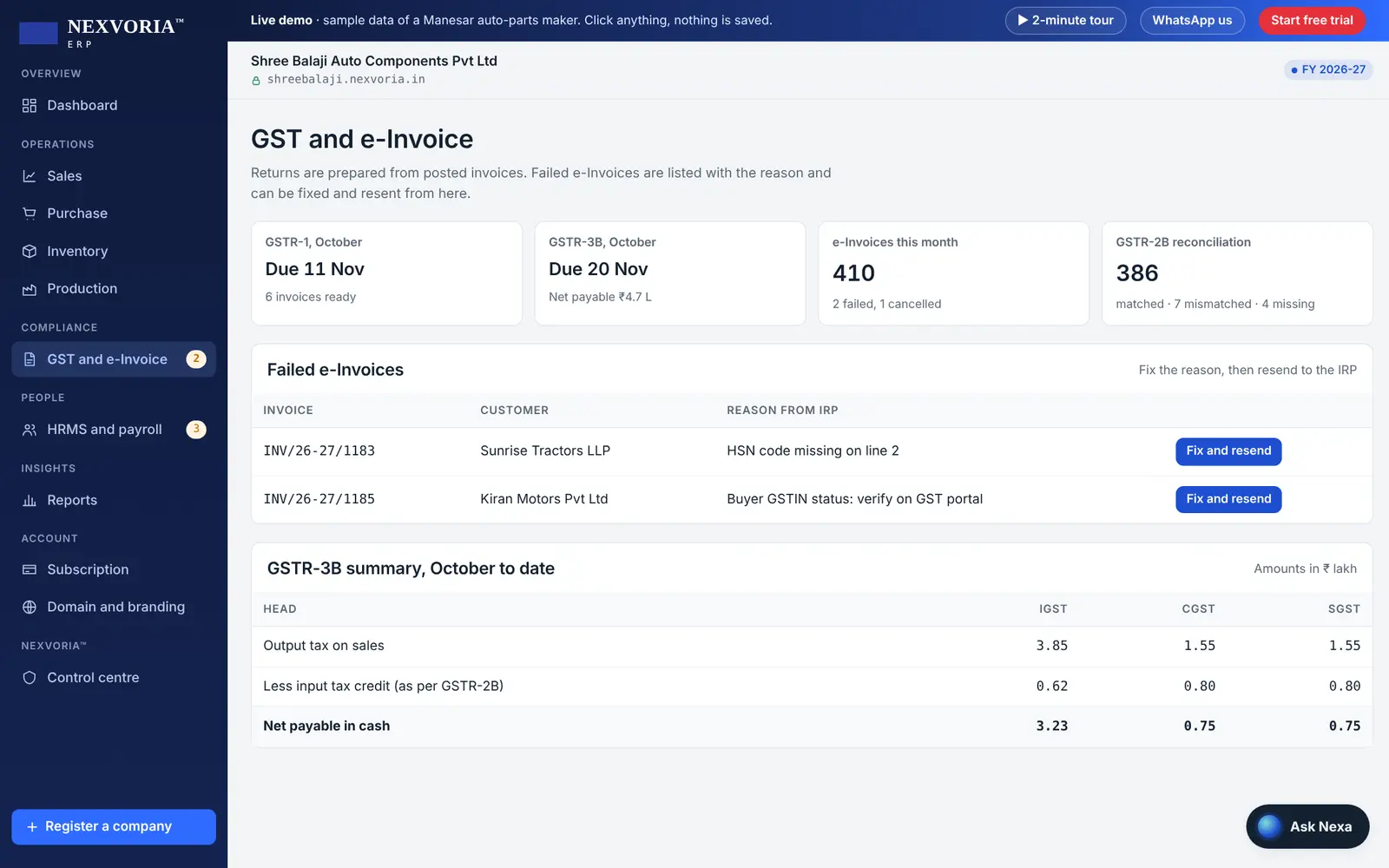
Every invoice posts straight into your accounts, stock and GST returns, so nothing is typed twice. If the e-Invoice portal rejects an invoice, NEXVORIA™ shows the reason in plain English with a fix-and-resend button.
The live demo needs no sign-up or password. The free trial needs no card.
What you get
GST billing in NEXVORIA™ ERP: what you get
Manufacturers, traders, distributors, retailers and service firms that raise GST invoices every day.
Tax worked out for you
Intra-state supplies get CGST and SGST, inter-state supplies get IGST, based on the place of supply. HSN or SAC codes and GST rates come from the item master.
e-Invoice from the invoice
The IRN and signed QR code come back while you wait and print on the invoice. No separate upload to the portal.
e-Way Bill for goods on the move
Delivery challans and invoices carry the e-Way Bill data: vehicle, transporter and distance.
Every kind of supply
B2B, B2C, exports with and without payment of tax, and SEZ supplies, with credit notes and receipts.
GSTIN checks
Customer and vendor GSTINs are checked when they are entered, and the name and address can be filled in from a GSTIN search.
Get paid faster
Put a Razorpay payment link on the invoice. When the customer pays, the receipt posts itself.
How it works
How it works in NEXVORIA™
- Add your items and services once, with HSN or SAC codes and GST rates. You can import them from Excel, Tally or Busy.
- Make a quotation, sales order or invoice. Pick the customer and the GST type is decided from their GSTIN and state.
- Post the invoice. The e-Invoice IRN and QR code come back, and the e-Way Bill can be generated for goods.
- The invoice prints on your letterhead and is sent by email or WhatsApp, with a payment link if you use Razorpay.
- The same invoice appears in GSTR-1 and GSTR-3B at month end, with nothing to re-enter.
Indian compliance built in
- e-Invoice (IRN and signed QR code) for businesses above the e-Invoice turnover limit
- e-Way Bill data on invoices and delivery challans
- CGST, SGST, IGST and cess, decided by the place of supply
- HSN and SAC codes on every line, with the HSN-wise summary for GSTR-1
- Reverse charge (RCM) self-invoices for purchases from unregistered suppliers
- Invoice series per branch or GSTIN, numbered by financial year
Try it now
The live demo opens a private sample company with this feature switched on. No sign-up, no password.
Open the live demoPlans and pricing
Included in every plan.
Prices are per company, shown per month and billed yearly, plus 18% GST. Every plan includes hosting, backups, updates and support, and the 14-day free trial opens every module.
Starter
₹1,199/ month
₹14,388 billed yearly, plus GST
Included
3 users · 1 branch
Start a 14-day free trialGrowth
₹2,999/ month
₹35,988 billed yearly, plus GST
Included
10 users · 3 branches · 50 employees on payroll
Start a 14-day free trialPro
₹5,999/ month
₹71,988 billed yearly, plus GST
Included
25 users · 10 branches · 150 employees on payroll
Start a 14-day free trialFAQ
Questions and answers
Does NEXVORIA™ ERP generate the e-Invoice IRN automatically?
Yes. When you post an invoice, NEXVORIA™ requests the IRN and signed QR code from the e-Invoice system and prints them on the invoice. If an invoice is rejected, the reason is shown with a fix-and-resend button.
Can I create an e-Way Bill from the invoice?
Yes. Invoices and delivery challans carry the e-Way Bill details, such as the vehicle number, transporter and distance, so the e-Way Bill is generated from the same document.
Is NEXVORIA™ suitable for a small business that does not need e-Invoice yet?
Yes. You can make GST invoices without e-Invoice and switch it on later when your turnover crosses the limit. The Starter plan covers GST billing, accounts and stock for a small business.
Can I bill from more than one GSTIN?
Yes. Each branch or GSTIN has its own invoice series and its own GST returns. The number of branches depends on the plan, and more can be added.
Do my invoices print with my logo?
Yes. Invoices, letters and reports print on your letterhead with your logo, address and GSTIN.
Keep exploring
Related features
GSTR-1 and GSTR-3B returns
NEXVORIA™ ERP prepares GSTR-1 and GSTR-3B for each GSTIN from the sales invoices, credit notes and purchase bills you post during the month, so the return matches your books.
Read more →Accounting software
NEXVORIA™ ERP is online accounting software for Indian businesses: double-entry books with a chart of accounts for your industry, customer and vendor ledgers, banking, GST and financial reports, in one cloud system.
Read more →POS billing for retail and pharmacy
NEXVORIA™ ERP includes a POS for counter billing: scan barcodes, split the payment between cash, UPI and card, print the bill, and close the day with a Z report, while stock and GST update in the same system.
Read more →Multi-branch and multi-GSTIN
NEXVORIA™ ERP runs several branches, warehouses and GST registrations in one company: each branch or GSTIN has its own invoice series and GST returns, reports can be seen by branch or GSTIN, and each person sees only the branches they work in.
Read more →See it with your own business in mind.
Open the live demo for your industry with no sign-up, or start a 14-day free trial with every module open.